参考:

https://mp.weixin.qq.com/s/lBnpSqfmYIYF1vqPuXHqbA

https://github.com/xianyu110/clawbot?tab=readme-ov-file#%E9%AA%8C%E8%AF%81%E5%92%8C%E6%B5%8B%E8%AF%95

0. 前置

咸鱼买的yunyi这家模型中转服务;同时支持gpt和codex使用

1. 环境准备

Ubuntu22.04.5

1
2
3
4
5
6
7
8
9
10
11
12
13
14
15
16
17
18
19
20
21
22
23
24
25
26
27
28
29
30
31
32
33
34
35
36
37
38
39
40
41
42
## 1. 静态IP
ip addr
1: lo: <LOOPBACK,UP,LOWER_UP> mtu 65536 qdisc noqueue state UNKNOWN group default qlen 1000
link/loopback 00:00:00:00:00:00 brd 00:00:00:00:00:00
inet 127.0.0.1/8 scope host lo
valid_lft forever preferred_lft forever
inet6 ::1/128 scope host
valid_lft forever preferred_lft forever
2: ens33: <BROADCAST,MULTICAST,UP,LOWER_UP> mtu 1500 qdisc fq_codel state UP group default qlen 1000
link/ether 00:0c:29:08:51:3e brd ff:ff:ff:ff:ff:ff
altname enp2s1
inet 192.168.100.156/24 brd 192.168.100.255 scope global noprefixroute ens33
valid_lft forever preferred_lft forever
inet6 fe80::84e5:14b0:8d63:fce6/64 scope link noprefixroute
valid_lft forever preferred_lft forever

## 2. 关闭防火墙
sudo ufw status
状态:不活动

## 3. 安装nvm
sudo apt update
sudo apt install curl

curl -o- https://raw.githubusercontent.com/nvm-sh/nvm/v0.39.1/install.sh | bash

source ~/.bashrc
source ~/.profile

nvm -v
0.39.1 ## 安装成功

## 4. 安装node
nvm install 22
nvm use 22
nvm alias default 22

node -v
v22.22.0

## 5. 安装clawbot
curl -fsSL https://clawd.bot/install.sh | bash

2. 配置

2.1 安装

1
2
3
4
5
6
7
8
9
10
11
12
13
14
15
16
17
18
19
20
21
22
23
24
25
26
27
28
29
30
31
32
33
34
35
36
37
38
39
40
41
42
43
44
45
46
47
48
49
50
51
52
53
54
55
56
57
58
59
60
61
62
63
64
65
66
67
68
69
70
71
72
73
74
75
76
77
78
79
80
81
82
83
84
85
86
87
88
89
90
91
92
93
94
95
96
97
98
99
100
101
102
103
104
105
106
107
108
109
110
111
112
113
114
115
116
117
118
119
120
121
122
123
124
125
126
127
128
129
130
131
132
133
134
135
136
137
## 1. 安装脚本
tom@openclaw:~$ curl -fsSL https://clawd.bot/install.sh | bash

🦞 OpenClaw Installer
iMessage green bubble energy, but for everyone.

✓ Detected: linux
✓ Node.js v22.22.0 found
→ Git not found
→ Installing Git...
...
...
✓ Git installed
→ Installing OpenClaw 2026.2.6-3...
→ npm install failed; cleaning up and retrying...
✓ OpenClaw installed

🦞 OpenClaw installed successfully (2026.2.6-3)!
Cozy. I've already read your calendar. We need to talk.

Starting setup...

## 2.配置文件:/.openclaw/openclaw.json
{
"meta": {
"lastTouchedVersion": "2026.2.6-3",
"lastTouchedAt": "2026-02-26T16:06:19.767Z"
},
"wizard": {
"lastRunAt": "2026-02-26T16:06:19.752Z",
"lastRunVersion": "2026.2.6-3",
"lastRunCommand": "onboard",
"lastRunMode": "local"
},
"models": {
"mode": "merge",
"providers": {
"yunyi-codex": {
"baseUrl": "https://yunyi.rdzhvip.com/codex",
"apiKey": "替换为自己的",
"auth": "api-key",
"api": "openai-responses",
"headers": {},
"authHeader": false,
"models": [
{
"id": "gpt-5.2",
"name": "GPT 5.2",
"reasoning": true,
"input": [
"text",
"image"
],
"cost": {
"input": 0,
"output": 0,
"cacheRead": 0,
"cacheWrite": 0
},
"contextWindow": 128000,
"maxTokens": 32768
}
]
}
}
},
"agents": {
"defaults": {
"model": {
"primary": "yunyi-codex/gpt-5.2"
},
"workspace": "替换为自己的",
"compaction": {
"mode": "safeguard"
},
"maxConcurrent": 4,
"subagents": {
"maxConcurrent": 8
}
}
},
"messages": {
"ackReactionScope": "group-mentions"
},
"commands": {
"native": "auto",
"nativeSkills": "auto"
},
"channels": {
"discord": {
"enabled": true,
"token": "替换为自己的",
"groupPolicy": "open"
},
"feishu": {
"enabled": false,
"connectionMode": "websocket",
"dmPolicy": "pairing",
"groupPolicy": "disabled",
"requireMention": true,
"domain": "feishu"
},
"kook": {
"enabled": true,
"token": "替换为自己的",
"dmPolicy": "pairing",
"groupPolicy": "open",
"requireMention": false
}
},
"gateway": {
"port": 18789,
"mode": "local",
"bind": "loopback",
"auth": {
"mode": "token",
"token": "替换为自己的"
},
"tailscale": {
"mode": "off",
"resetOnExit": false
}
},
"plugins": {
"entries": {
"discord": {
"enabled": true
},
"feishu": {
"enabled": false
},
"kook": {
"enabled": true
}
}
}
}

2.2 智能记忆系统

参考: https://github.com/denda188/ClawIntelligentMemory

2.3 Searxng搜索

参考:https://zhuanlan.zhihu.com/p/26288570729

2.4 Kook

参考: https://github.com/Eric-Song-Nop/openclaw-kook/

2.5 skill

1
2
3
4
1. send email
2. https://json-render-cli.vercel.app/
3. daily-ai-news
4. stock-analysis

2.6 feishu

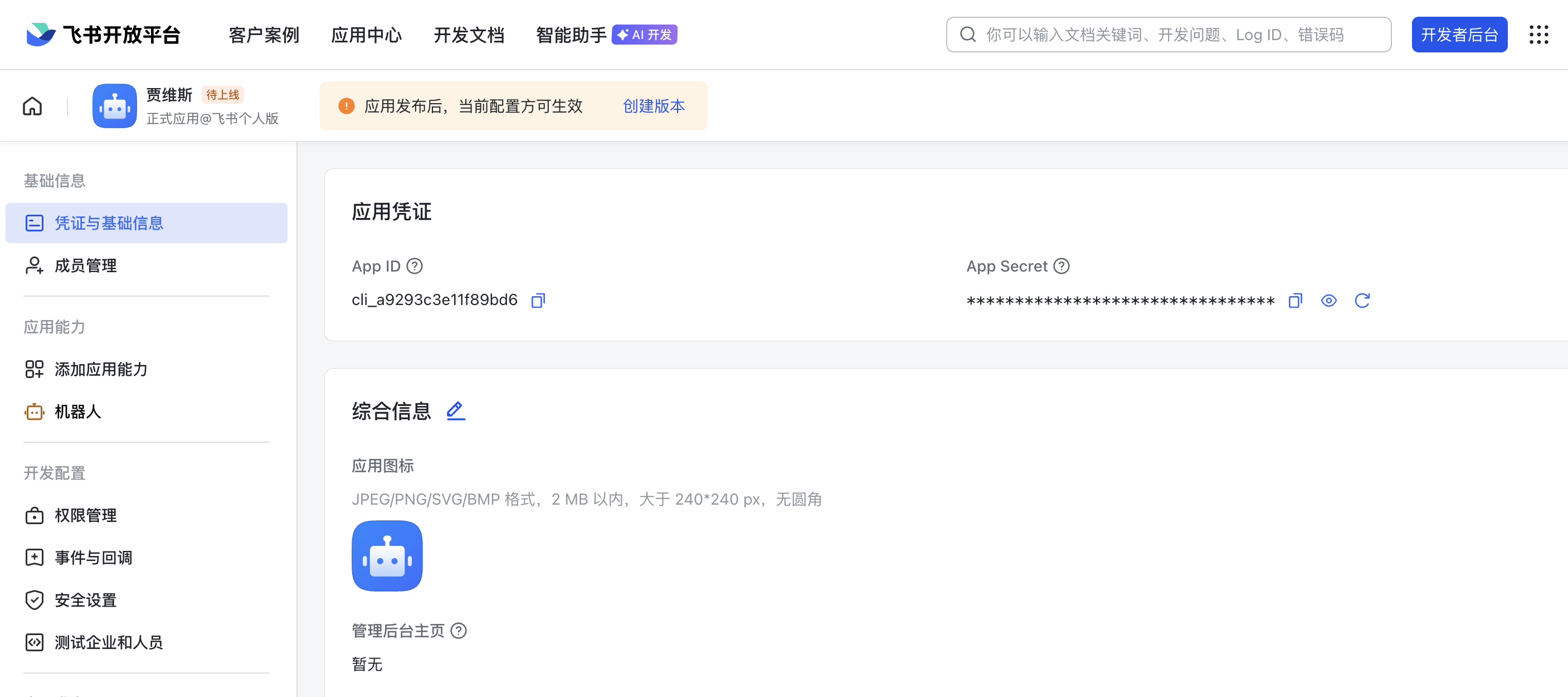
2.6.1 创建飞书机器人

image-20260301075510015

记录下App Id和App Sercet

2.6.2 配置openclaw
1
openclaw config

本站由 卡卡龙 使用 Stellar 1.29.1主题创建

本站访问量 次. 本文阅读量 次.